全国服务咨询热线:
400-665-0028
- 用友软件专业服务机构
特价活动:>>>> 畅云管家新购、续费8折优惠,畅捷通T+cloud、好会计、易代账、好业财、好生意云产品8折优惠。
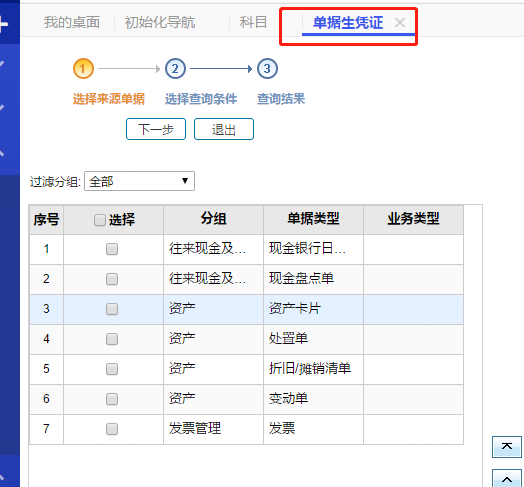
【问题现象】:
单据生凭证页面,看不到单据类型,以销货单为例
【解决方案】:
1.备份好账套数据,选择账套库,执行脚本:
select * from SM_VoucherType
找到所有单据的CODE和name,再去对应选择账套库,执行脚本,搜索未显示的单据的code:
select code, * from SM_VoucherType where name where name='销货单',对应找到销货单的code=SA04
2.选择账套库,执行脚本,脚本中的code改成查找到的code名称,对应红字是要修改的部分。执行完脚本之后重新配置数据库,重启服务,再去登录即可
update SM_VoucherType set disabled=0 where code='SA04'
update SM_FC_DocSourceVoucherType set isvisiable=1 where idvouchertype in (select id from SM_VoucherType where code='SA04')
客服电话:400-665-0028
关键字:用友财务软件,畅捷通软件,财务软件,进销存软件,U9官网,用友U8,用友T1,用友T+,用友T3,用友T6,畅捷通好会计,好生意,智+好业财,用友培训服务售后公司,畅捷通运营培训服务公司
版权所有:用友畅捷通软件 Copyright © 2026 All rights reserved.