全国服务咨询热线:
400-665-0028
- 用友软件专业服务机构
特价活动:>>>> 畅云管家新购、续费8折优惠,畅捷通T+cloud、好会计、易代账、好业财、好生意云产品8折优惠。
【问题现象】:
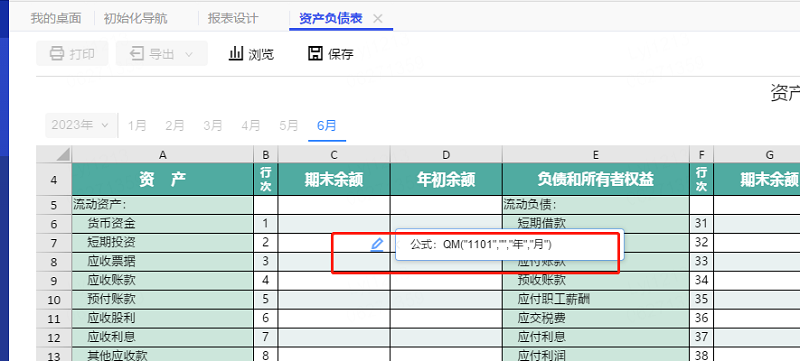
客户点开预制资产负债表,发现公式错误,但是是预制报表,不想一个个修改,想恢复系统预制的资产负债表公式
【解决方案】:
备份数据,执行脚本,查找对应的templateSourceID
select templateSourceID,* from SR_Template where name ='资产负债表'
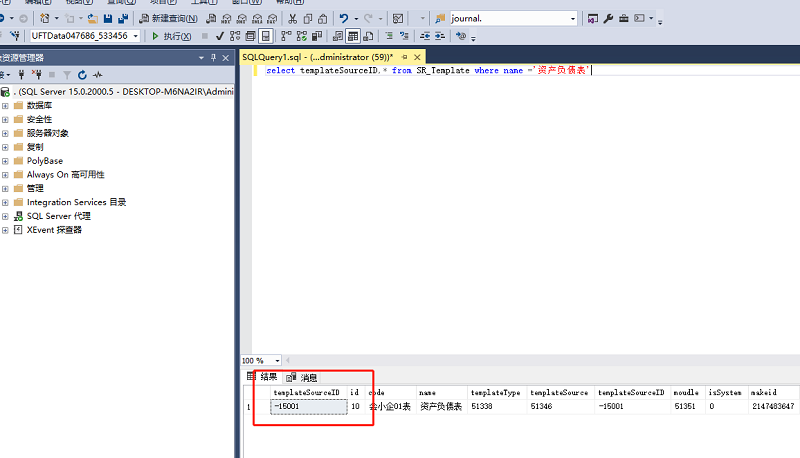
数据库找到对应templateSourceID是 :-15001,则按以下脚本进行修改,如果查出来的templateSourceID是其他的数,下方脚本的-15001,换成查出来的值即可
脚本如下:
DELETE SR_ReportDataFormula where idReportDataDTO in (Select id FROM SR_ReportData where templateID in(-15001))
DELETE SR_ReportDataCell where idReportDataDTO in(Select id FROM SR_ReportData where templateID in(-15001))
DELETE SR_ReportData where templateID in(-15001)
DELETE SR_PeriodTemplate where TemplateID in(-15001)
DELETE SR_KeyWord where TemplateID in(-15001)
DELETE SR_TemplateCell where idTemplateDTO in(Select id FROM SR_Template where templateSourceID in(-15001))
DELETE SR_Template where templateSourceID in(-15001)
客服电话:400-665-0028
关键字:用友财务软件,畅捷通软件,财务软件,进销存软件,U9官网,用友U8,用友T1,用友T+,用友T3,用友T6,畅捷通好会计,好生意,智+好业财,用友培训服务售后公司,畅捷通运营培训服务公司
版权所有:用友畅捷通软件 Copyright © 2026 All rights reserved.